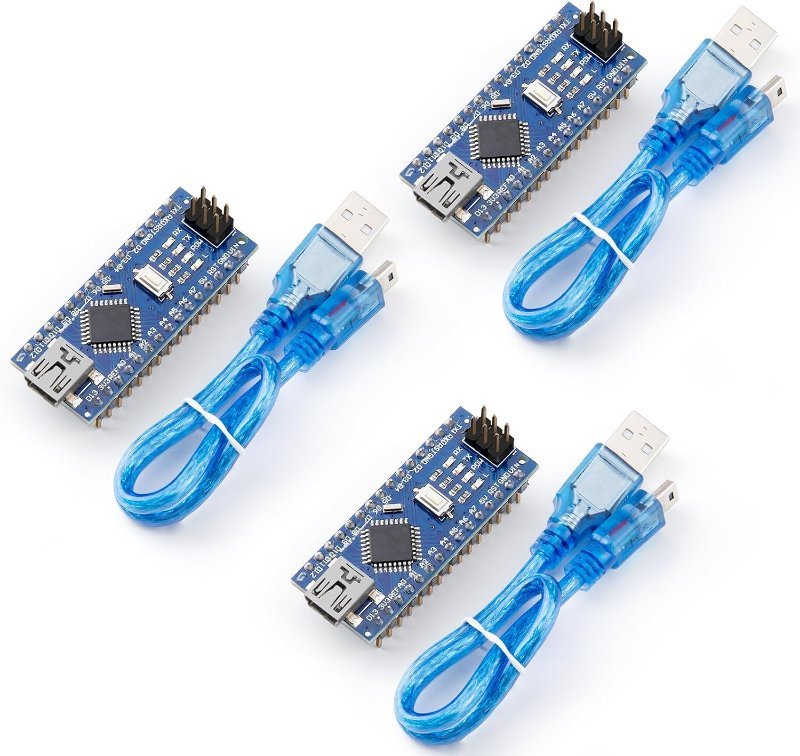
Short answer: yes, the cheap one is fine. I have a drawer of Nano clones and exactly one genuine Arduino Nano, and the clones have run everything from a plant-watering timer to a servo rig without complaint. But “fine” comes with two asterisks, and both of them are the reason people end up on a forum at 11pm convinced their board is dead. Neither has anything to do with the microcontroller.
A “clone” Nano usually isn’t a counterfeit
This matters, because the word gets thrown around as if buying a third-party Nano were the same as buying a fake Rolex. It isn’t. Arduino publishes its board designs under an open-source hardware license, which means anyone can legally build and sell a board to those schematics. A board sold as “Nano V3.0, compatible with Arduino” is a legal copy of a public design — Arduino’s trademark covers the name and logo, not the circuit.
A counterfeit is a different animal: a board that stamps the Arduino wordmark and infinity logo on itself to pass as the real product. Those exist, and they’re the ones worth avoiding — not because the silicon is worse, but because you paid genuine-board money for a clone. The honest clones don’t pretend. ELEGOO, HiLetgo, and the rest put their own name on the silkscreen and say “compatible with Arduino,” which is exactly what they are.
The real difference is one chip, and it is not the brain
Both boards carry the same microcontroller. Arduino’s own tech specs for the classic Nano (product code A000005) list an ATmega328 running at 16 MHz on 5 V, with 32 KB of flash (2 KB of which the bootloader eats), 2 KB of SRAM, 1 KB of EEPROM, 22 digital I/O pins — six of them capable of PWM — and 8 analog inputs, at 20 mA per I/O pin and a 7–12 V recommended input range. A clone gives you the identical part at the identical clock. Your sketch compiles to the same machine code and runs the same way.
What changes is the other chip — the USB-to-serial bridge. The ATmega328 doesn’t speak USB. It speaks UART, a two-wire serial protocol, so every Nano needs a translator sitting between the USB port and the microcontroller’s RX/TX pins to convert USB data to serial and back. On a genuine Nano that translator is an FTDI FT232RL; Arduino’s store page says so outright. On virtually every clone it’s a WCH CH340 — usually the CH340G, which needs an external crystal oscillator, or the newer CH340C, which has the crystal built in.
Functionally they do the same job. The difference you actually feel is driver support. FTDI chips have been ubiquitous for two decades and every OS knows them. The CH340 is usually fine too, but it sometimes needs a driver on first connection or after an OS update, and when installed it shows up with a different name: USB-SERIAL CH340 (COM##) under Ports in Windows Device Manager, /dev/cu.wchusbserial* on macOS, /dev/ttyUSB0 on Linux. If you plug in a clone and no port appears in the Arduino IDE, that’s the first thing to check — and our guide to an Arduino that won’t show up on your computer walks the rest of it. One more trap worth knowing: plenty of USB cables are charge-only and have no data lines at all, so a “dead” board is sometimes a dead cable.
The FTDI mess that still colors this argument
Here’s the part people half-remember and get backwards. In August 2014, FTDI shipped Windows driver versions 2.11.0 and 2.12.0 that detected counterfeit FT232RL chips and set their USB product ID to 0, which rendered the board unrecognizable to Windows, macOS, and Linux alike. Not disabled — bricked, as far as any computer was concerned. FTDI pulled the drivers from Windows Update after the backlash, and CEO Fred Dart promised a replacement that would reject fakes “in a non-invasive way.” The 2016 version delivered on that in its own fashion: instead of bricking the chip it injected NON GENUINE DEVICE FOUND! into the serial stream, an undocumented behavior that quietly corrupts whatever your sketch was printing.
Notice what that story is actually about: fake FTDI chips. A clone Nano with an honest CH340 on it has no exposure to any of this, because there’s no FTDI driver in the picture to object. The boards at risk were the ones trying to pass themselves off as FTDI. So the episode is a solid argument against counterfeit silicon and a surprisingly weak one against buying a clearly-labeled CH340 board.
The bootloader setting that makes clones look broken
This is the one that genuinely costs people an evening. In early 2018 Arduino switched the Nano’s stock bootloader — the tiny program that lives in flash and receives your sketch over serial — to a newer, faster one. The Arduino IDE’s default Nano setting expects that newer bootloader. Clone Nanos, including brand-new ones, very often ship with the older pre-2018 bootloader still on them.
Mismatch the two and upload fails with a wall of avrdude: stk500_recv(): programmer is not responding, which reads exactly like a dead board. It isn’t. Go to Tools → Processor and switch from ATmega328P to ATmega328P (Old Bootloader), then upload again. That single dropdown resolves the overwhelming majority of “my clone Nano won’t take a sketch” reports. If it doesn’t, our walkthrough of that specific avrdude error covers the less common causes.
Nobody tells you this when you buy the board, and it is almost certainly the single biggest reason clones have a reputation for being unreliable.
Where clones do actually fall short
I’m not going to pretend they’re identical. Quality control is the honest gap: in a three-pack you can get one board with a slightly crooked header row, a sloppy solder joint on the Mini-B connector, or a USB socket that feels like it will tear off the PCB if you look at it wrong. The connector is usually the weak point, because the classic Nano uses Mini-B, a fragile through-hole part that takes all the mechanical abuse. Some clones also ship with headers loose in the bag rather than soldered, which is fine if you own an iron and a nuisance if you don’t.
Then there’s the stuff that isn’t on the board at all. Arduino’s store includes warranty coverage and access to official Arduino user support; a clone three-pack includes a seller you will never hear from again. For a hobby project that’s a non-issue — the third board in the pack is your warranty. For something going into a classroom, a client install, or anything where a failure costs more than five dollars, paying for a supported part is a reasonable call. And the unglamorous point: the IDE, the core libraries, and the documentation you use for free are funded by board sales. Buying genuine occasionally is how that keeps existing.
What I’d actually buy
This post contains affiliate links. If you buy through them, this site earns a commission at no extra cost to you.
For learning, prototyping, and anything you might permanently solder into a project box, buy clones in a multipack and buy the version that includes cables. The classic Nano’s Mini-B port is the one connector you probably don’t already have a cable for, and a pack that bundles them costs no more than one that doesn’t. Three boards for well under the price of a single genuine Nano means you can leave one buried in a finished build instead of cannibalizing it, which is the actual argument for clones — not the per-unit savings, the freedom to stop being precious about the hardware.
Pre-soldered headers, the correct ATmega328P at 16 MHz, and three Mini-B cables so you aren’t hunting for one. ELEGOO puts its own name on the board rather than faking Arduino’s, and its boards are the ones I reach for by default. Expect to set Processor to “Old Bootloader” on first upload.
Check Price on Amazon →0x1E 0x95 0x0F — anything else means the board isn’t carrying what the listing claimed. Same tool fixes the bootloader headache permanently: set Tools → Programmer → USBasp, hit Burn Bootloader, and your clone now takes sketches on the default Nano setting like any other board.
avrdude -c usbasp -p m328p -v

  Reading | ################################################## | 100%
  Device signature = 0x1e950f (probably m328p)
Buy the genuine board when the five dollars is not the variable that matters. If you’re teaching a class and cannot afford to debug a bad header in front of twenty students, if you need a part you can file a warranty claim on, or if you simply want the reference hardware against which every tutorial was written, get the real one. It’s also the right first board if you’re troubleshooting-averse: no driver install, no bootloader dropdown, no ambiguity about whether the board or your wiring is at fault.
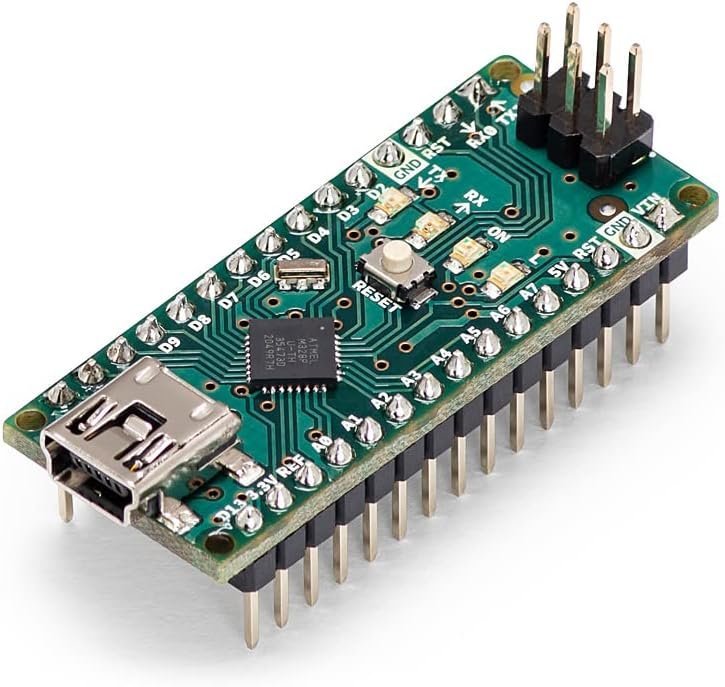
The reference board: ATmega328P at 16 MHz, FT232RL USB-to-serial, Mini-B connector, 45 × 18 mm and 7 grams. Warranty and official Arduino support included, and no bootloader surprises. Worth buying at least once if the tutorials you follow assume stock behavior.
Check Price on Amazon →And then there’s the category nobody expects: clones that are flatly better than the original in one specific way. Arduino has never updated the classic Nano’s Mini-B port, so the genuine board still needs a cable you probably threw out in 2015. Several clone makers moved to USB-C. Same ATmega328P, same 5 V logic — so the same wiring rules apply, and if you’re mixing it with a 3.3 V board you still need to read up on logic level differences — but you can charge it off the cable already on your desk.
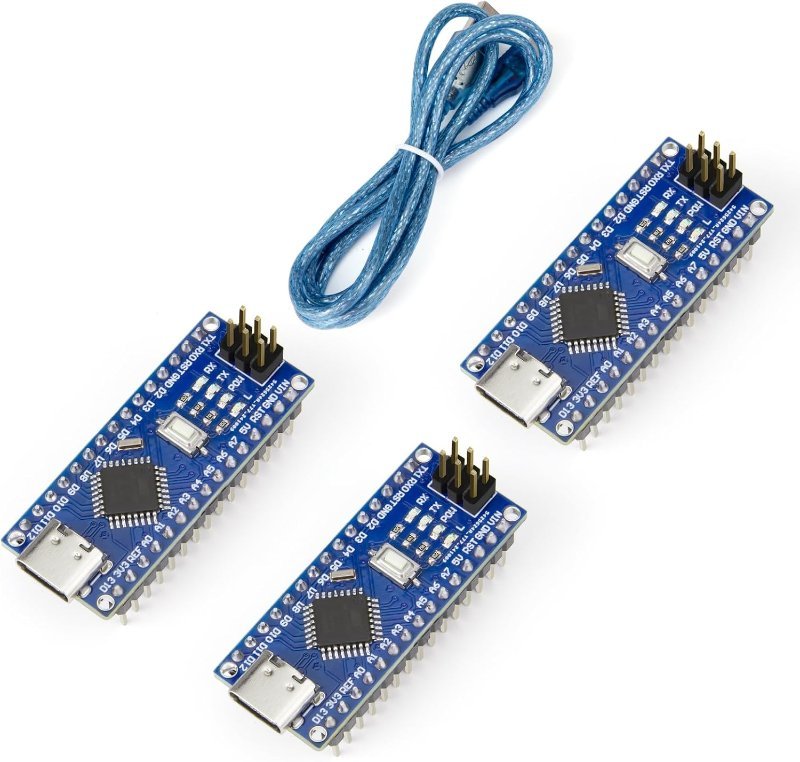
The fix Arduino never shipped. USB-C instead of Mini-B, headers already soldered, cable in the box. If the only thing keeping you off the Nano form factor is hunting for a Mini-B cable, this is the version to own.
Check Price on Amazon →The bottom line
Buy clones. Buy them three at a time, buy them from a seller who puts their own name on the silkscreen rather than Arduino’s, and know going in that you may install a CH340 driver once and flip one dropdown to “Old Bootloader.” Those two five-minute chores are the entire difference for a hobbyist, and nearly every horror story about clone Nanos is really a story about not knowing them. Keep one genuine Nano in the drawer as your known-good reference for when something genuinely baffles you — that’s the most useful thing the real board does, and it’s worth the premium for that alone. If you’re still deciding on the form factor at all, our Uno vs. Nano comparison is the better place to start.