There is a specific look that gives away a homemade alarm system, and it has nothing to do with the code. It’s the breadboard sitting on the windowsill with a tangle of jumper wires draped over it, a bare LED blinking through the dust, and a USB cable snaking off to a laptop that has to stay awake for the whole thing to work. It functions. It just announces itself as a science fair project, which is the opposite of what a security device should do.
The builds that don’t look homemade all converge on the same handful of decisions, and none of them are exotic. The pattern shows up over and over in real projects — the SecureGuard build on Hackster.io is a clean example: an Arduino, a PIR motion sensor, a membrane keypad, and an LCD, with entry and exit delays that make it behave like a commercial panel instead of a tripwire. That last part is the real trick, and it’s worth pulling apart.
What actually separates a real alarm from a motion-triggered buzzer
A beginner motion alarm reads a sensor pin, and when it goes HIGH it screams. That’s a tripwire. A real alarm has states, and the state machine is the thing that makes it feel finished:
- Disarmed — the sensor is still being read, but nothing happens. You walk past it a hundred times a day.
- Exit delay — you punch in the code, and the system waits 30 seconds before it starts caring. This is what lets you arm it and then leave without tripping it yourself.
- Armed — motion now matters.
- Entry delay — motion was detected, but instead of instantly blaring, it gives you a window to disarm. This is the single biggest difference between “homemade” and “bought.”
- Alarm — the delay expired without a valid code. Now it screams, and it keeps screaming until disarmed.
All five of those live in one switch statement and a couple of millis() comparisons. No delay() calls — delay() freezes the whole sketch, so a 30-second delay() during an exit countdown means the keypad is deaf for 30 seconds. You track a timestamp when the state changes and compare it against millis() on every loop pass instead. That one habit is most of what makes an Arduino project feel responsive rather than laggy.
The detection half: a PIR sensor, dialed in properly
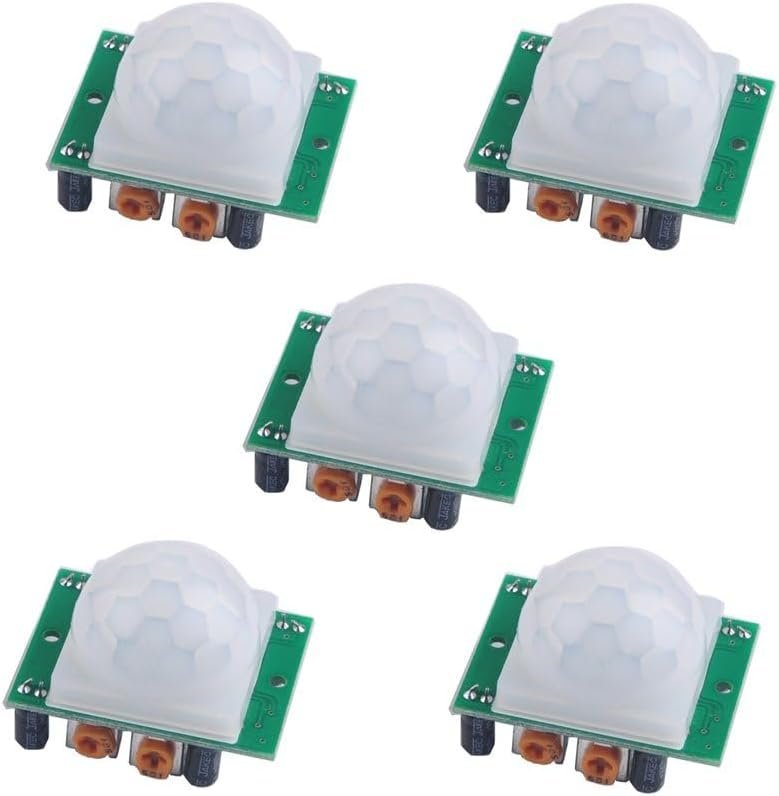
Passive infrared is the right sensor for this and the wrong one to leave at factory settings. A PIR doesn’t emit anything — it watches for changes in infrared radiation across its field of view, which is why a warm body moving through a room registers and a warm body sitting still eventually stops registering. The HC-SR501 is the module essentially every one of these builds uses, and it covers roughly a 110° cone out to 3–7 meters depending on how you set it.
Two things about it trip people up. First, the board wants 4.5–20V on its VCC pin — feed it the Uno’s 5V rail, not 3.3V, because despite the name it won’t run reliably at 3.3V. Its output, though, swings to 3.3V when triggered, not 5V. That’s still comfortably above the Uno’s logic-HIGH threshold so digitalRead() sees it fine, but it’s a good illustration of why input and output voltages on a module are separate questions (we went deep on this in 5V vs. 3.3V logic levels).
Second: the two orange potentiometers on the board are not decoration. One sets sensitivity (detection distance, roughly 3 to 7 meters), the other sets how long the output stays HIGH after a trigger — anywhere from about 0.3 seconds to five minutes. There’s also a jumper for trigger mode. In repeatable mode (H), continued motion keeps extending the timer; in non-repeatable mode (L), the output goes HIGH, runs out its delay, and won’t retrigger until it resets. For an alarm you want repeatable mode and a short delay — your sketch should own the timing logic, not the sensor’s onboard timer.
This post contains affiliate links. If you buy through them, this site earns a commission at no extra cost to you.
Buy these in a multipack. You will want one aimed at the front door, one at the hallway, and one spare for the inevitable unit you desolder a header onto badly. Five of them costs less than a single commercial door sensor.
The standard PIR module, with both trim pots and the trigger-mode jumper. Runs off the Uno’s 5V rail, outputs 3.3V logic, 110° detection cone. Five to a pack so you can cover more than one room without reordering.
Check Price on Amazon →millis() and the pin state to the Serial Monitor. Walk through the doorway at different speeds and watch where it actually triggers — you’ll find the real edge of the detection cone is nothing like the 110° on the spec sheet once furniture is in the way. Then add a magnetic reed switch on the door itself as a second zone: it’s normally closed, so wire one side to ground and the other to an input with INPUT_PULLUP, and an opened door reads HIGH. Two independent zones is the point where this stops being a demo.
The interface half: this is what “homemade” actually means
Here’s the uncomfortable truth about these builds: the electronics are nearly identical between the one that looks professional and the one that looks like a hobby project. The difference is almost entirely the human-facing surface. A keypad mounted flush in a wall plate with an LCD above it reads as a product. The same Arduino with a pushbutton and a blinking LED reads as a toy.
A 4×4 membrane keypad is the cheapest upgrade in the entire project. It’s a matrix of 16 switches on 8 pins — four rows, four columns — and the Arduino Keypad library scans it for you, driving one row LOW at a time and checking which column reads LOW in response. You get numeric entry for the disarm code plus * and # for confirm and cancel, which is exactly the vocabulary people already expect from an alarm panel. The membrane is flat and adhesive-backed, so it mounts cleanly to a faceplate with no bezel gap.
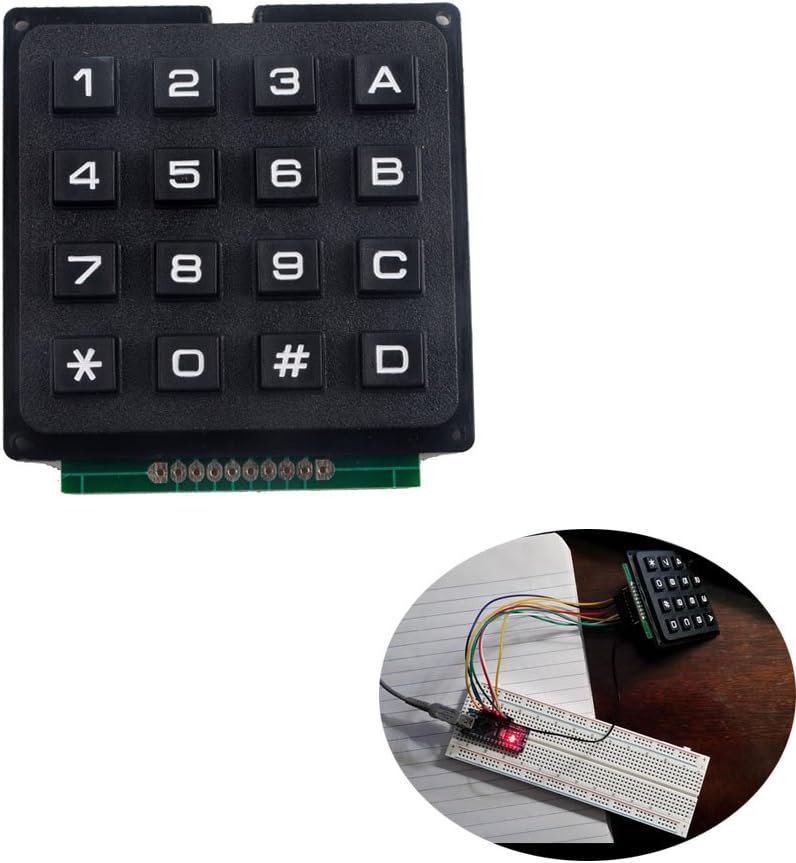
Flat adhesive-backed membrane, 8-pin ribbon, works directly with the Arduino Keypad library. Takes 8 digital pins on an Uno — plan your pin budget around it, or move the LCD to I2C to free some up.
Watch the pin budget here. A 4×4 keypad eats 8 digital pins. A parallel-wired 16×2 LCD eats another 6. Add the PIR, a buzzer, and a reed switch and you have blown past an Uno’s 14 digital pins. The standard fix is an I2C LCD backpack, which collapses those 6 display pins down to 2 (SDA and SCL) by talking over a shared two-wire bus instead of a dedicated line per signal. If you’d rather just have more pins than solve the puzzle, that’s a real option too — we compared the tradeoff in Arduino Mega vs. Uno.
The three details that do the most work
Power it from the wall, permanently. Nothing screams prototype like a USB cable running to a laptop. A 9V barrel-jack wall adapter into the Uno’s power jack makes it a fixture rather than an experiment, and it survives the laptop going to sleep. We covered the tradeoffs between battery, USB, and wall power in more detail here.
Put it in an enclosure. A project box with the keypad cut into the lid costs a few dollars and does more for perceived quality than any amount of code refactoring. Cut the hole undersized and file it out — you cannot un-cut a hole that’s too big.
Store the code somewhere it survives a reset. A disarm code hardcoded as const char* CODE = "1234"; is fine for a first build, but writing it to EEPROM instead means the user can change it from the keypad and it persists through a power cut. The AVR’s EEPROM is rated for around 100,000 write cycles, which is irrelevant for a code you change twice a year.
Where this build genuinely falls short
Be honest with yourself about what you’re building. An Arduino alarm is an excellent way to learn state machines, matrix scanning, non-blocking timing, and EEPROM — and it’s a real deterrent in the sense that a loud noise is a deterrent. It is not monitored, it has no cellular backup, it has no tamper detection, and anyone who unplugs the wall adapter has defeated it entirely. A commercial system’s actual product isn’t the sensor, it’s the monitoring contract.
Build it because the state machine is a genuinely good exercise and because a keypad-and-LCD panel you made yourself is satisfying every time you walk past it. Don’t build it as your only line of defense on a house you care about.