A servo that twitches at rest, buzzes like an angry wasp, or stutters halfway through a sweep feels broken. It almost never is. Jitter is the servo faithfully reporting a problem somewhere else — usually in how you’re powering it, sometimes in how you’ve wired it, and more often than anyone wants to admit, in the code driving it. Work through the suspects in this order and you’ll fix it in one sitting.
What the Servo Is Actually Listening To
A hobby servo expects a control pulse about every 20 milliseconds, and the width of that pulse — roughly 1 to 2 milliseconds — tells it what angle to hold. The Arduino Servo library generates that pulse train for you; when you call myServo.write(90), you’re really setting a pulse width. Inside the servo, a small circuit compares where the output shaft is to where the pulse says it should be, and drives a motor to close the gap. That’s the whole trick — and it means jitter has exactly two possible origins: the pulse isn’t steady, or the power feeding that little motor isn’t. (If servos are new to you, our servos vs. DC motors vs. steppers guide covers the fundamentals.)
Cause #1: You’re Powering It From the Arduino’s 5V Pin
This is the cause in the overwhelming majority of cases, so start here. An SG90-class micro servo sips about 10 mA sitting idle, pulls 100–250 mA while moving, and can spike past 650 mA when it stalls against a load. A USB port budgets around 500 mA for the entire board. Every time the servo’s motor kicks on, it yanks the 5V rail down for a few milliseconds; the servo’s own control circuit browns out, loses its place, and corrects — over and over. That’s the twitch. The telltale symptom: everything works fine with the servo unloaded, and the jitter shows up the moment it has to push on something. Push it far enough and the Arduino itself resets.
This post contains affiliate links. If you buy through them, this site earns a commission at no extra cost to you.
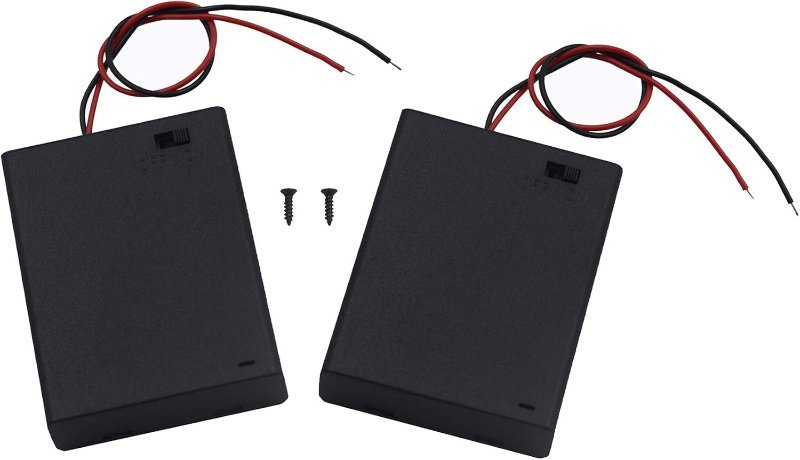
The fix costs less than a fancy coffee: give the servo its own supply. Four AA cells in a holder puts out 6 V — inside the 4.8–6 V range every standard hobby servo is built for — and batteries deliver current spikes without the voltage sag a USB port or a small regulator suffers. A holder with built-in switch and bare leads plugs straight into a breadboard, and you stop yanking wires every time you want to kill power.
Six volts, an on/off switch, bare leads for the breadboard, and enough current headroom that your servo stops caring about stall spikes. Comes as a two-pack, so one build gets power and the next one does too.
Check Price on Amazon →Cause #2: The Grounds Aren’t Connected
The moment you add a second power source, you’ve created the second-most-common cause of jitter: a floating ground. The Arduino’s control pulse is a voltage, and a voltage is always measured relative to something — specifically, relative to ground. If the servo’s ground goes to the battery pack and the signal wire comes from an Arduino with no ground connection between them, the servo has no stable reference for reading the pulse. It’ll guess, badly, forever. The rule: the battery pack’s negative lead, the servo’s brown/black wire, and an Arduino GND pin all connect together. One jumper wire. Do not skip it.
Cause #3: Your Code Is Fighting the Servo
If the power side checks out, look at what you’re feeding write(). The classic offender is a servo driven by a potentiometer or sensor through analogRead(): analog readings naturally flicker by a few counts, so your code commands 92°, then 91°, then 93°, dozens of times a second — and the servo dutifully performs the tremble you asked for. Smooth the input (average a handful of readings) or add a deadband: only call write() when the new angle differs from the last one by more than a degree or two.
Two quieter software gotchas. First, on an Uno the Servo library takes over Timer1, the hardware timer that also runs analogWrite() on pins 9 and 10 — so PWM on those two pins silently stops working, and other timer-hungry libraries (some tone and LED libraries, for instance) can fight the Servo library for the same timer and corrupt the pulse train. Second, if the servo only buzzes while holding still and nothing above applies, you can call myServo.detach() once it reaches position — no pulses, no corrections, no buzz — and attach() again when you next need to move. It’s a workaround rather than a fix, but for a display stand or gauge that parks in one spot, it’s a perfectly respectable one.
The Five-Minute Checklist
- Servo on its own supply (4×AA pack or equivalent), not the Arduino’s 5V pin
- All grounds tied together — battery negative, servo ground, Arduino GND
- A 470µF capacitor across the servo’s power leads if spikes persist
- Smoothing or a deadband on any sensor value you feed to
write() - Nothing else using Timer1 — and no
analogWrite()expected on pins 9 or 10 - Still buzzing at rest?
detach()until you need to move again
Ninety percent of jittering servos are cured by the first two items. The servo was never broken — it was just being asked to run a motor off a power rail that couldn’t carry one.