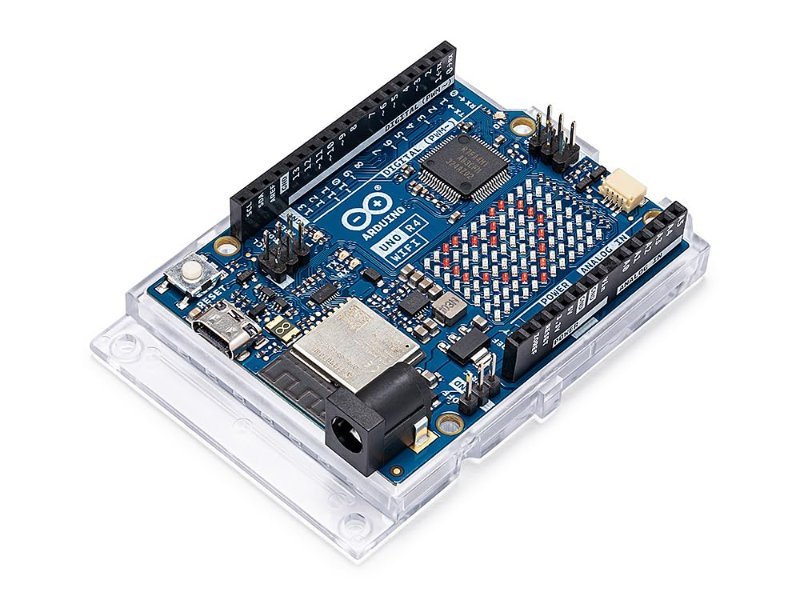
People ask this like it’s a versus question, and it isn’t. An Arduino and a Raspberry Pi are not two competing versions of the same thing. One is a microcontroller and the other is a computer, and once that distinction clicks, the “which one” question mostly answers itself. So let’s make it click.
The short version
An Arduino runs one program, forever, the instant it gets power. No operating system, no boot time, no files. It’s built to read pins and flip pins, thousands of times a second, with timing you can count on. A Raspberry Pi boots Linux, has a desktop, a web browser, Python, a file system, and Wi-Fi, and can do a hundred things at once. It is, for all practical purposes, a small laptop with exposed pins on the edge.
If your project is “make this physical thing respond to that physical thing” — a motor, a sensor, an LED strip, a servo — you want the Arduino. If your project is “process data, serve a web page, run a camera, talk to the internet, play video” — you want the Pi. Plenty of good builds use both, and I’ll get to that.
What a microcontroller actually is
The chip at the heart of a classic Arduino Uno is an ATmega328P: an 8-bit processor running at 16 MHz with 2 KB of RAM. Two kilobytes. That sounds like a joke next to a phone, but it’s the point. A microcontroller doesn’t need memory for an operating system because there isn’t one. Your code is the whole machine. The setup() function runs once, the loop() function runs over and over until you unplug it, and nothing else is competing for the processor’s attention.
That single-mindedness is what makes microcontrollers good at real-time work. When you tell an Arduino to send a pulse to a servo every 20 milliseconds, it sends the pulse every 20 milliseconds. No background update, no garbage collector, no scheduler deciding your task can wait. The newer Uno R4 boards moved to a 32-bit Renesas RA4M1 at 48 MHz with 32 KB of RAM, so there’s more headroom now, but the philosophy is identical: one job, done predictably.
Microcontrollers are also stupidly forgiving about power. An Uno will happily run off a 9V battery or a USB port and pull a few tens of milliamps doing it. Yank the power mid-program and nothing corrupts; plug it back in and it’s running again within milliseconds.
What a single-board computer actually is
The Raspberry Pi 5 has a quad-core 64-bit Arm Cortex-A76 at 2.4 GHz, between 1 and 16 GB of RAM depending on which one you buy, dual 4K HDMI outputs, USB 3.0, gigabit Ethernet, Wi-Fi, Bluetooth, and a PCIe lane you can hang an NVMe SSD off. It runs Raspberry Pi OS, a full Debian Linux. You can plug in a keyboard and monitor and use it as a desktop. That is a completely different category of machine, and the specs make the gap obvious: roughly a thousand times the clock speed and a million times the memory of an Uno.
The trade is that all that capability comes with an operating system in the way. A Pi takes 20 or 30 seconds to boot. It needs a clean shutdown or you risk corrupting the microSD card it boots from. It draws a few watts idle and can pull 5 amps at 5V under load with the Pi 5, which is why the official power supply is a 27W USB-C brick and not a phone charger. And because Linux is juggling dozens of processes, the timing on its GPIO pins (the “general purpose input/output” header — the 40 pins along the edge) is only approximately real-time. Good enough to blink an LED or read a button, not good enough to drive eight servos smoothly while doing anything else.
One more practical gotcha: the Pi’s GPIO pins are 3.3V logic and not 5V-tolerant. Feed a 5V sensor output straight into one and you can kill the pin. The Uno’s pins are 5V. If you’re going to mix parts across the two ecosystems, read 5V vs. 3.3V Logic Levels, Explained first, because this is the single most common way beginners cook a Pi.
Analog input: the difference nobody mentions
Here’s something that surprises people: the Raspberry Pi has no analog input pins at all. An Arduino Uno has six (A0 through A5), each with a built-in analog-to-digital converter that turns a voltage between 0 and 5V into a number from 0 to 1023. That’s how you read a potentiometer, a photoresistor, a soil moisture probe, a flex sensor — basically anything that outputs a smoothly varying voltage rather than a clean on/off. On a Pi you need an external ADC chip like the MCP3008 wired over SPI before you can read any of those. It’s not hard, but it’s one more board, one more library, and one more thing to debug, for something the Arduino does out of the box.
Cost and the current Pi price problem
Historically the cost argument was a wash — a Pi and an Uno both landed in the $25 to $35 range. That’s no longer true. Memory shortages driven by AI hardware demand pushed Raspberry Pi to raise prices twice in early 2026; the 16 GB Pi 5 that launched at $120 went to $205 and has since climbed again, and even the 4 GB and 8 GB boards are up $15 to $30 over their original prices. Raspberry Pi did introduce a 1 GB Pi 5 at $45 as a floor, but by the time you add the required power supply, a case with active cooling, and a microSD card, a working Pi 5 setup runs well over $100. A complete Arduino setup is still a $20 to $30 board and a USB cable.
Which one you actually need
Pick the Arduino if you’re new to electronics. Not because it’s simpler in some patronizing sense, but because it puts nothing between you and the hardware. You wire a sensor, you write ten lines, you see the result. Every failure is either your wiring or your code, and there’s no operating system to blame. Motor control, robots, sensor logging, LED projects, anything battery-powered, anything that must never crash: Arduino.
Pick the Pi if the project is really a software project that happens to have a few wires attached. Home servers, network-attached storage, retro game emulation, a Home Assistant hub, computer vision with a camera module, a dashboard on a screen, anything where “install Python and pip install a library” is the natural first step.
And the best answer for a lot of intermediate projects is both, connected by a USB cable. The Pi is the brain: it runs the web interface, does the math, talks to the cloud. The Arduino is the nervous system: it drives the motors and reads the analog sensors with hard real-time timing, and reports back over serial. A Pi-brained rover with an Arduino handling the wheels is a classic architecture for exactly this reason.
What to buy
This post contains affiliate links. If you buy through them, this site earns a commission at no extra cost to you.
For the Arduino side, skip the R3 clones this time and get the official Uno R4 WiFi. You get the 32-bit RA4M1 core, USB-C, an onboard ESP32-S3 handling Wi-Fi and Bluetooth, a 12×8 LED matrix, and a Qwiic connector for solderless I2C sensors — all at a price that’s barely above what a genuine R3 used to cost. The Wi-Fi matters here specifically because it closes some of the gap with the Pi: an R4 WiFi can post sensor readings to the internet on its own, which used to be the whole reason people reached for a Pi.
Official board, 48 MHz 32-bit core, USB-C, Wi-Fi and Bluetooth via the onboard ESP32-S3, six true analog inputs, and 5V pins that shrug off beginner mistakes. The right starting point for anything that moves or senses.
Check Price on Amazon →For the Pi side, don’t buy a bare board unless you already have the accessories. The Pi 5 is finicky about power and needs cooling under any sustained load, and a kit that bundles the 27W supply, an active cooler, a case, and a preloaded microSD card saves you the annoyance of discovering that one piece at a time. CanaKit’s 4 GB Essentials kit is the one I’d point people at: 4 GB is plenty for a desktop, a media box, or a robot brain, and the kit includes the parts you’d otherwise buy separately anyway.
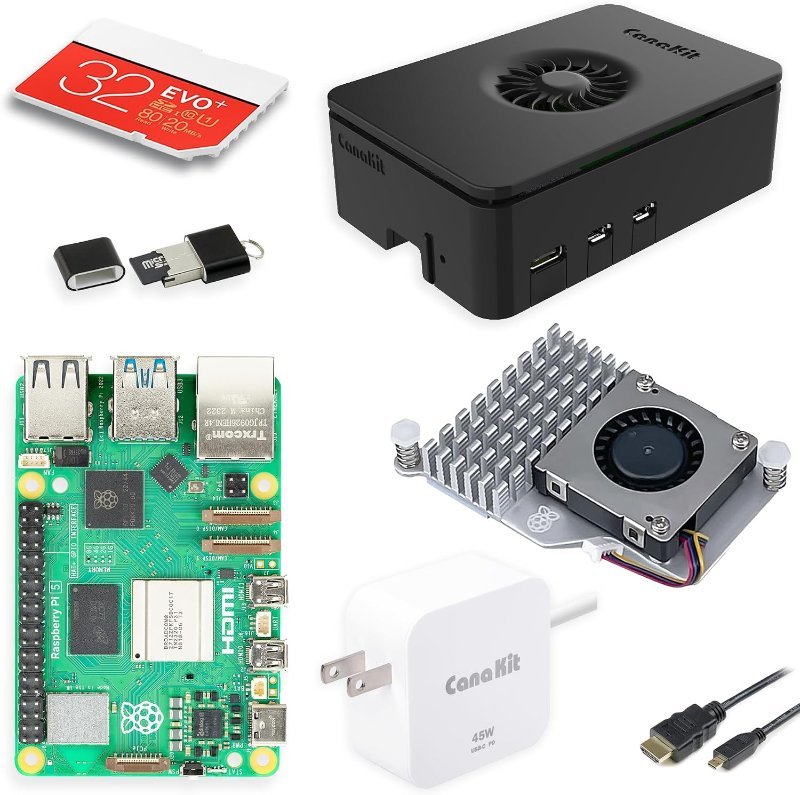
Pi 5 with 4 GB of RAM plus the official-spec 27W USB-C supply, active cooler, case, and microSD card with the OS preloaded. Everything needed to boot to a desktop the day it arrives.
Check Price on Amazon →analogRead(A0) to serial every 100 ms with a potentiometer on A0. Then, on the Pi, read that stream with five lines of Python using the pyserial library and plot it live. You’ve just built the brain-and-nervous-system split from scratch: the Pi does the software, the Uno does the analog reading the Pi physically can’t.
Bottom line
Stop thinking of this as a choice between two boards and start thinking of it as a choice between two jobs. Real-time hardware control: Arduino. General computing with some pins on the side: Raspberry Pi. If you’re starting out and want to learn electronics rather than Linux, the Arduino is the cheaper, tougher, more direct path — and when you eventually outgrow it, the Pi will still be there to be its brain.