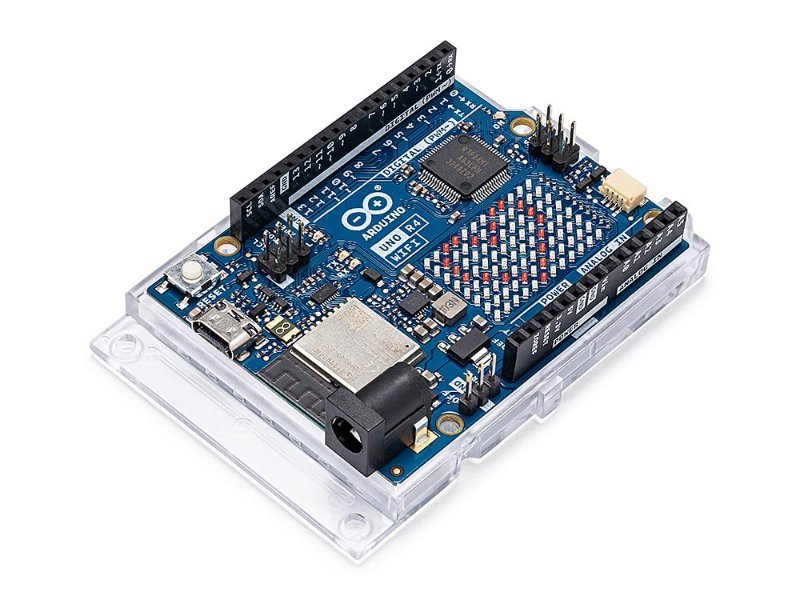
The Arduino Uno has looked and worked almost the same way since 2010: same ATmega328p chip, same 16MHz clock, same PWM-faked analog output. The Uno R4, which started shipping in 2023, is the first real hardware jump the board has gotten in over a decade — a new microcontroller, a genuine analog output pin, USB-C, and, on the WiFi variant, wireless built right in. The question worth answering before you spend the money: does any of that actually change what you can build, or is it just a spec sheet upgrade?
What’s Actually Different Under the Hood
The R3 runs an 8-bit Microchip ATmega328p at 16MHz, with 32KB of flash storage and 2KB of RAM — numbers that haven’t moved since the original Uno. The R4 swaps that out for a Renesas RA4M1, a 32-bit Arm Cortex-M4 chip clocked at 48MHz, with 256KB of flash and 32KB of RAM. That’s roughly 3x the clock speed, 8x the flash, and 16x the RAM. Sketches that used to choke on floating-point math or large arrays — audio processing, juggling multiple sensor buffers, more elaborate state machines — run noticeably smoother, and you’ll hit the “low memory” compiler warning a lot less often.
The Upgrades You’ll Actually Notice
Clock speed looks good on a spec sheet, but three other changes matter more day-to-day. First, the R4 has a real 12-bit DAC on pin A0 — analogWrite() there produces an actual analog voltage instead of the R3’s PWM trick, where a digital pin flickers on and off fast enough to fake an average voltage. That matters for anything generating a clean reference voltage, driving analog audio, or feeding gear that expects true analog input rather than a chopped-up square wave. Second, USB-C replaces the R3’s clunky USB-B connector — more durable, and it goes in either way up, which sounds trivial until you’ve jammed a USB-B cable in upside down at midnight. Third, there’s a built-in operational amplifier and CAN bus support, both of which used to require an external breakout board and now just don’t.
WiFi or Minima: Which One to Buy
The R4 ships in two versions. The Minima ($20) gets you the new chip, the DAC, USB-C, and the op-amp with nothing else added — a direct, no-frills replacement for the R3. The WiFi version ($27.50) adds an Espressif ESP32-S3 module for WiFi and Bluetooth Low Energy, a 12×8 LED matrix for animations or plotting sensor data without wiring up a separate display, and an onboard Qwiic connector for solderless I2C sensor hookups. Unless you’re building something that will genuinely never touch a network or a display, the WiFi version is worth the extra $7.50 — it’s the one we tested and the one we’d point a beginner or upgrader toward.
This post contains affiliate links. If you buy through them, this site earns a commission at no extra cost to you.
The full-featured version of the new board — ESP32-S3 WiFi/Bluetooth, 12×8 LED matrix, Qwiic connector, and the same 32-bit chip, real DAC, and USB-C as the Minima. The one we’d actually recommend.
Check Price on Amazon →analogWriteResolution(12); in setup, then ramps analogWrite(A0, value) from 0 to 4095 in a loop. Probe A0 with a multimeter set to DC volts while it runs. On an R3, that same code would just be toggling a pin fast enough to fake a voltage; here you’ll watch a real, steady reading climb from 0V up toward 5V in lockstep with your code.
Will Your Old Projects Still Work?
Mostly, yes. The R4 keeps the same physical footprint, pin layout, and 5V logic levels as the R3, so existing shields and wiring diagrams carry over without changes. Code is largely portable too — standard calls like digitalWrite(), analogRead(), and Serial.println() behave the same way. The exception is any sketch or library that reaches directly into AVR-specific registers or interrupt vectors, which shows up in some older motor-control and precise-timing libraries written specifically for the ATmega328p. Those need a rewrite or a compatible replacement, since the R4’s Cortex-M4 doesn’t share that instruction set.
Is It Worth the Upgrade?
If you’re buying your first Arduino, get the R4 — there’s no real reason to start on the older, slower board when the new one costs about the same and does more. If you already own an R3 and it’s handling your projects fine, you don’t need to replace it; PWM-faked analog output and 2KB of RAM haven’t stopped anyone from finishing a beginner robotics build. Where the R4 earns its keep is the next tier up: real signal processing, driving true analog gear, wanting WiFi without bolting on a separate shield, or a project complex enough that the R3’s memory becomes the actual bottleneck. For that work, it’s not a marginal upgrade — it’s the board that should have existed years ago.