There is no analog output on an Arduino Uno. None. The function is called analogWrite(), the pins are silkscreened with a wavy tilde, and the LED you plug in dims smoothly from off to blazing — and yet at no point does the chip ever produce 2.7 volts. It produces 5 volts, then 0 volts, then 5 volts again, hundreds of times a second, and lets physics do the rest.
That trick is PWM — pulse-width modulation — and it is one of those concepts that stays slightly mystical until somebody spells out the mechanism. Once it clicks, a handful of other things about the board stop being mysterious too: why only six pins can do it, why your motor whines at one particular pitch, and why delay() starts lying to you if you go poking at timer registers.
A Digital Pin Has Exactly Two Settings
Start with the limitation, because PWM exists to work around it. Every digital pin on the ATmega328P is a switch. digitalWrite(9, HIGH) connects pin 9 to the 5V rail; digitalWrite(9, LOW) connects it to ground. There is no third state and nothing in between. If you want the fuller picture of which pins do what, and why the analog input pins are a completely different animal, we went through that in digital vs. analog pins on Arduino.
So you cannot ask a pin for half voltage. What you can do is flip it very fast and control the ratio.
PWM Changes the Ratio, Not the Voltage
analogWrite(9, 128) does not output 2.5V. It outputs a square wave that spends about half of each cycle at 5V and half at 0V. The average is 2.5V, and for a lot of loads the average is the only thing that matters.
The fraction of each cycle spent HIGH is the duty cycle. analogWrite() takes a value from 0 to 255, so the duty cycle is simply that value divided by 255:
- 0 — 0% duty; the pin is just held LOW
- 64 — about 25% duty
- 128 — about 50% duty
- 255 — 100% duty; the pin is just held HIGH
Notice the two endpoints. At 0 and at 255 the pin is not pulsing at all — it is doing a plain digitalWrite(). Everything between them is a square wave. Here is the classic fade, which is worth typing out rather than reading:
int led = 9;              // a pin with a ~ beside it

void setup() {
  pinMode(led, OUTPUT);
}

void loop() {
  for (int v = 0; v <= 255; v++) {
    analogWrite(led, v);  // HIGH for v/255 of each cycle
    delay(5);
  }
  for (int v = 255; v >= 0; v--) {
    analogWrite(led, v);
    delay(5);
  }
}
An LED and a 220Ω resistor on pin 9 gets you a smooth two-and-a-half-second breath in and out. Your eye never sees the flicker, and in a moment it will be clear why.
The Six Pins Marked With a Tilde
On an Uno R3, only pins 3, 5, 6, 9, 10, and 11 can do PWM — the ones printed with a ~. Call analogWrite() on any other digital pin and the core does not throw an error; it quietly falls back to a digitalWrite(), HIGH for values of 128 and up, LOW for anything below. Your LED snaps to full brightness halfway through the sweep and you lose twenty minutes wondering why your fade became a step function. "Is it actually a tilde pin?" is the first question to ask.
Those six are not an arbitrary selection. They are the pins wired to the three hardware timers inside the ATmega328P, two pins per timer:
- Timer0 → pins 5 and 6 → roughly 980 Hz
- Timer1 → pins 9 and 10 → roughly 490 Hz
- Timer2 → pins 3 and 11 → roughly 490 Hz
A timer is a counter in silicon that runs whether or not your code is doing anything. That is the part worth internalizing: once analogWrite() has set a duty cycle, the hardware keeps toggling that pin forever without your sketch spending a single instruction on it. Which is why you can fade an LED and poll a sensor in the same loop and the fade does not stutter.
The frequency split matters less often than people expect, but it does matter twice. First, 490 Hz is well inside human hearing — PWM a small DC motor from pin 9 and you may hear a faint whine at that pitch as the windings flex; the same motor on pin 5 or 6 whines higher and usually quieter. Second, Timer0 has a day job: it is the timer driving millis(), micros(), and delay(). You absolutely can reprogram its prescaler to change the PWM frequency on pins 5 and 6, and the instant you do, every timekeeping function on the board starts returning wrong numbers. Do your frequency experiments on 9, 10, 3, or 11.
This post contains affiliate links. If you buy through them, this site earns a commission at no extra cost to you.
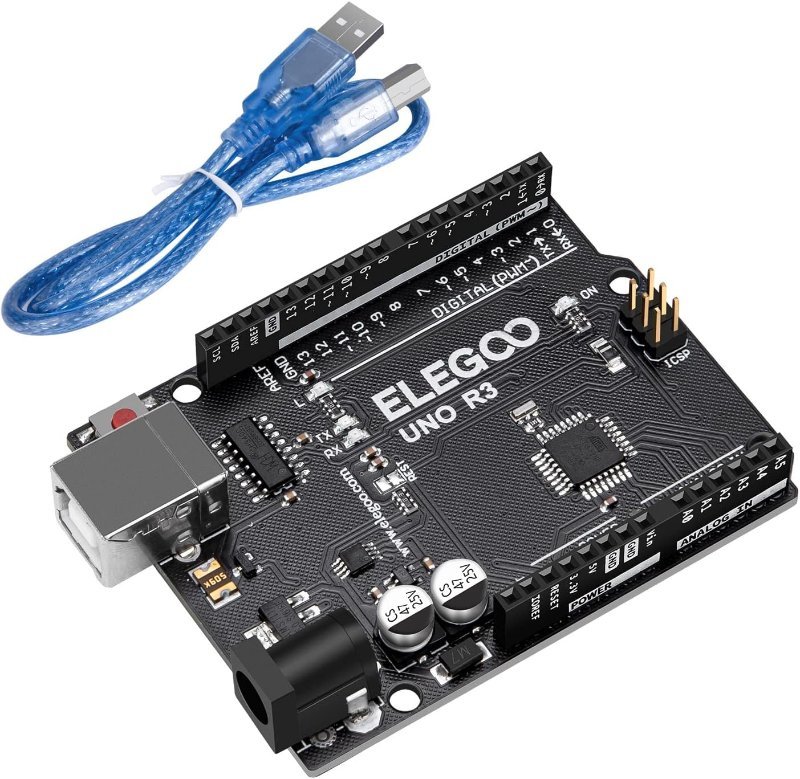
All six tilde pins are present on any Uno R3, genuine or clone, which makes a clone the cheapest place to actually run these experiments. ELEGOO’s board is the one I keep on the bench for pin-level poking like this — same ATmega328P, same six PWM pins in the same positions, with a CH340C handling USB instead of the ATmega16U2 a genuine board uses. That one substitution is most of the price difference, and the only practical consequence is that some machines need the CH340 driver installed before the port shows up.
A straight Uno R3 clone with all six tilde-marked PWM pins where you expect them. CH340C USB chip, so grab the driver if your machine does not see the port. The right board to experiment on when you would rather not risk a pricier one.
Check Price on Amazon →fc = 1 / (2πRC)), about thirty times below pin 9’s 490 Hz, which is what keeps the ripple down.
Why "Average Voltage" Is a Useful Lie
That filter hints at the real rule: PWM works when something in the circuit averages the signal for you. Different loads do that averaging in completely different ways, and knowing which is which tells you immediately whether PWM is the right tool.
An LED averages nothing at all. It is genuinely blinking 490 times a second at full brightness, and your retina does the integrating. That is why 50% duty looks like half brightness even though the LED is never once half-lit. At 490 Hz you will not perceive flicker while sitting still, though you may notice banding if you wave the LED around or try to film it on a phone.
A DC motor averages mechanically and electrically at once. The rotor has inertia and the windings have inductance, and both smooth out pulses far faster than the motor can physically react to them. So 50% duty really does give you a slower motor rather than a motor stuttering between stopped and flat out. A heating element averages thermally, and so slowly that PWM is close to ideal for it.
What does not work is anything that reads the instantaneous voltage. Feed raw PWM into an op-amp input, an analog input on another chip, or a control input expecting a real DC level, and it sees a square wave — because a square wave is what is actually there. For those cases you either filter it as above, or reach for a real digital-to-analog converter: the Uno R4 has a genuine 12-bit DAC on A0, and there are small I²C DAC breakouts if you are staying on an R3.
Driving the Duty Cycle From Something Physical
Hardcoded fade loops get boring quickly. The version that actually teaches you something is a knob, because it forces you to confront the resolution mismatch sitting in the middle of the Uno.
analogRead() returns 0–1023, because the ADC is 10-bit. analogWrite() wants 0–255, because PWM here is 8-bit. The conversion is map(raw, 0, 1023, 0, 255), or just raw / 4, or raw >> 2 if you feel like showing off. All three throw away the bottom two bits, so a full sweep of the knob gives you 256 distinct brightness steps, not 1024:
void loop() {
  int raw = analogRead(A0);          // 0 - 1023
  int duty = map(raw, 0, 1023, 0, 255);
  analogWrite(9, duty);
  Serial.print(raw); Serial.print("\t"); Serial.println(duty);
}
You want a potentiometer you can actually seat in a breadboard, and that is a smaller category than it sounds. Most cheap 10K pots are panel-mount WH148 types with flat solder lugs that will not sit in breadboard holes — you end up pinching them at an angle and swearing. Adafruit’s breadboard-friendly version has proper pins on a 0.1-inch pitch, so it just plugs in and stays put. One of them costs more than a bag of twenty of the wrong thing, which is the correct trade here.
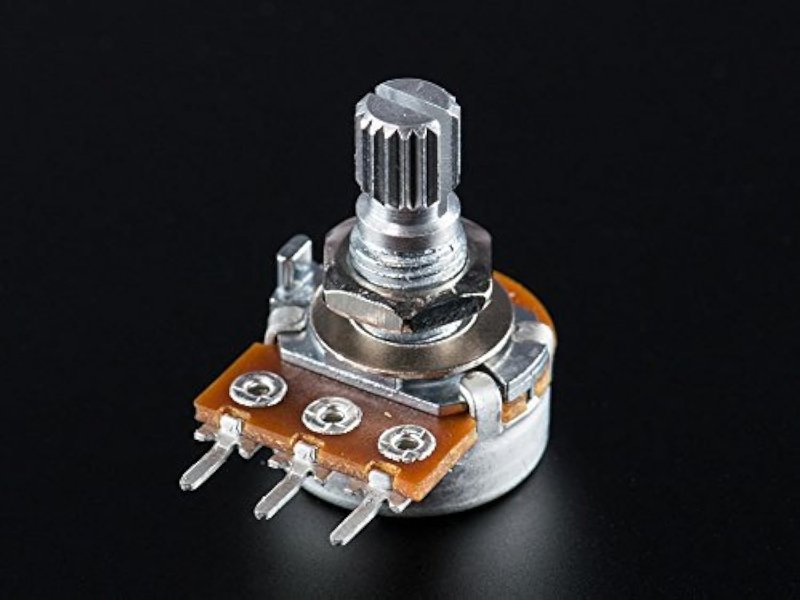
A 10K linear pot with 0.1-inch-pitch pins that actually plug into a breadboard, instead of the flat panel-mount lugs on most cheap multipacks. Wire the outer pins to 5V and ground, the wiper to A0, and you have live control of duty cycle.
Check Price on Amazon →analogRead() value next to the mapped 0–255 value. Now turn the knob as slowly as you can. The raw number climbs through four values while the mapped one sits perfectly still, then both jump together. That is 10-bit resolution being squeezed into 8 bits, visible in real time, and it is the clearest demonstration of what "resolution" means that you will get without an oscilloscope.
When 20 Milliamps Is Not Enough
PWM out of a pin is a control signal, not a power supply. The ATmega328P datasheet puts the recommended current per I/O pin at 20 mA, with 40 mA as the absolute maximum before you start risking the pin, and 200 mA total across the whole chip. One indicator LED is fine. A 12V LED strip, a 5V case fan, a small water pump — not even close. This is the same ceiling behind a lot of mystery brownouts; we dug into the symptoms in fixing power issues when running multiple servos or motors.
The fix is to have the pin switch a transistor rather than the load itself. A MOSFET breakout does this with three connections: your PWM pin to the signal input, a separate supply for the load, and a shared ground between them. The duty cycle passes straight through to whatever is wired to the output terminals, and the Arduino only ever sources the few milliamps needed to charge a gate. That is the pattern behind every PWM fan controller, including the one in our temperature-controlled fan build.
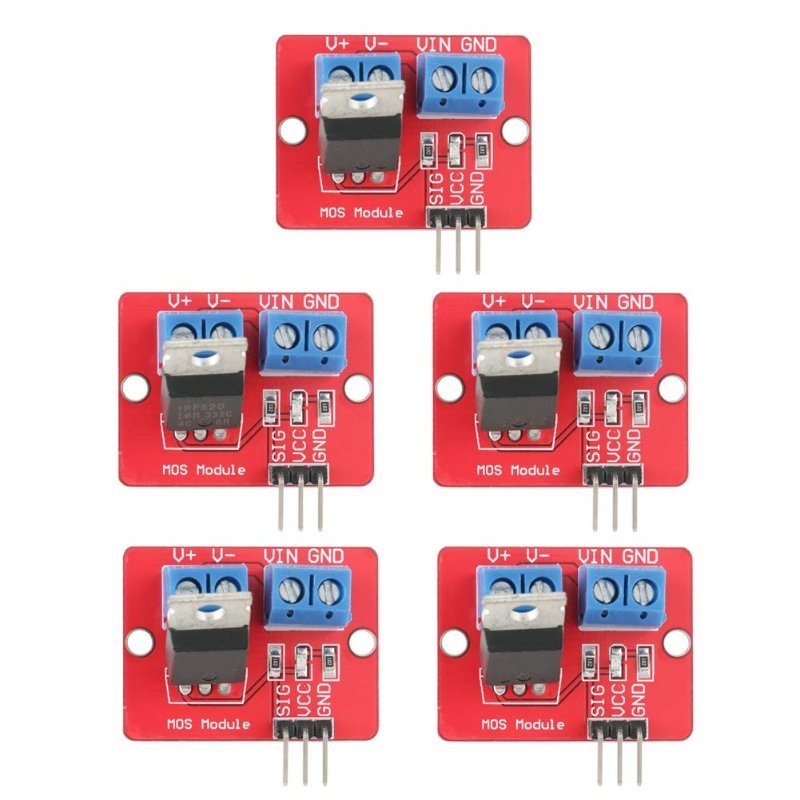
Screw terminals, a 3-pin signal header, and 0–24V output. Feed it a tilde pin and it will dim an LED strip or throttle a small fan without the Arduino sourcing the current. Rated 5A, but treat roughly 1A as the real ceiling unless you add a heatsink — see the caveat below.
Check Price on Amazon →One honest caveat on these, since the listings never mention it. The IRF520 is not a logic-level MOSFET — its on-resistance is specified with 10V on the gate, and a 5V Arduino pin only gets it partly turned on. It works, and for strip dimming or a small fan it works fine, but it runs warmer than it should and the 5A rating is fantasy without a heatsink bolted on. If you need real current, buy a module built around a logic-level part like an IRLZ44N instead. These are the right thing for learning the pattern cheaply, five to a bag.
A Servo Signal Is Not a Duty Cycle
These two get conflated constantly, so it is worth separating them cleanly. A hobby servo wants a 50 Hz signal — a 20 ms period — in which the pulse width carries the command: about 1.0 ms for one end of travel, 1.5 ms for center, 2.0 ms for the other end. That is a duty cycle somewhere between 5% and 10%, a sliver of range that analogWrite()’s 0–255 scale cannot address with any useful precision, at a frequency it does not produce in the first place.
So the Servo library does not use analogWrite() at all. On an Uno it commandeers Timer1 and generates those pulses itself. And since Timer1 is exactly what drives PWM on pins 9 and 10, the moment you #include <Servo.h> and attach a servo, analogWrite() stops working on both of those pins. Not a bug, not fixable, and it catches people constantly — move your LED to pin 3, 5, 6, or 11. More on the hardware side of this in our SG90 micro servo writeup.
PWM Looks Different on Other Boards
Move off the Uno and the rules change, mostly for the better.
ESP32 does not use analogWrite() as its native API. It has a dedicated peripheral called LEDC: sixteen independently configurable channels, routable to almost any GPIO, with resolution you select anywhere from 1 to 16 bits and a frequency you choose yourself. You call ledcWrite() instead. Sixteen bits is 65,536 steps rather than 256, which is the difference between visible stepping at the dim end of a fade and a fade that is actually smooth. Remember it is a 3.3V part, though — see 5V vs. 3.3V logic levels before wiring it to anything 5V. We compared the boards themselves in our ESP32 dev board roundup.
Raspberry Pi Pico puts PWM on every single GPIO, served by eight hardware slices with two channels apiece. No hunting for tilde markings.
Uno R4 keeps the familiar analogWrite() but adds analogWriteResolution(), so you can step up from 8-bit to 12-bit. It also has a true DAC on A0 — an actual analog output rather than an averaged square wave, with 0–4095 mapping across the full range. If the filter experiment above left you wanting the real thing, that is where it lives.
The Short Version
PWM is one pin, two voltages, and a ratio you control. The pin is never at an in-between voltage; the LED, the motor, or the heater does the averaging, and when the load cannot average, you add a capacitor or a real DAC. Six pins on an Uno, three timers behind them, one of which you should leave alone. That is the entire mechanism — and knowing it is the difference between analogWrite() being a magic incantation you half-trust and a tool you can reason about the moment it misbehaves.