Here is the sequence almost every beginner hits eventually. One servo works perfectly. You add a second one, and now the first one twitches. You add a third, and the board resets mid-sweep — the Serial Monitor spits out your startup message again like the sketch just began. Nothing in your code changed. The code isn’t the problem.
What changed is how much current your circuit is asking for, and where it’s asking for it from. Motors are not like LEDs. An LED draws a steady few milliamps and never surprises you. A motor’s draw spikes hard at the exact moment it starts moving or hits resistance, and if that spike has to come through the Arduino, the Arduino is the thing that breaks.
The numbers that explain everything
An SG90 micro servo — the little blue 9g one in every starter kit — sits at roughly 10–15 mA when it’s idle and holding position. Moving under light load, it’s around 100–250 mA. But its stall current, the draw when the horn is physically prevented from reaching the angle you commanded, runs about 650–700 mA. Stall isn’t an exotic failure case, either: it happens every time a servo pushes against its own mechanical limit, or a linkage binds, or your robot arm holds something heavier than it likes.
Now compare that to what the Arduino can actually give you. The Uno R3’s onboard regulator (an NCP1117 or AMS1117 depending on the board revision) is nominally rated for 1 A, but it’s a linear regulator with no heatsink — it burns off the difference between your input voltage and 5 V as heat, dumped into the PCB copper. In practice, 400–500 mA total off the 5 V pin is the realistic ceiling when you’re running from the barrel jack. And when you’re powered over USB instead, you’re behind a 500 mA polyfuse, sharing that budget with the ATmega328P, the USB interface chip, and every LED on the board.
Two SG90s stalling simultaneously want something like 1.3 A. You are asking a 500 mA budget for 1.3 A. The voltage on the 5 V rail sags, the microcontroller’s brown-out detector sees the supply fall below its threshold, and it does the only safe thing it can: it resets. That’s your mysterious restart.
How this shows up in the wild
Power starvation rarely announces itself as “not enough power.” It disguises itself:
- The board resets when a motor starts. The clearest symptom. Brown-out detection firing on the voltage dip.
- Servos jitter or buzz while holding a position. A servo constantly measures its own position and corrects. On a sagging rail, those corrections get erratic and it hunts back and forth.
- The last servo in the chain moves weakly or not at all. Whatever’s left in the budget after the others take their share.
- Serial output turns to garbage. Undervoltage affects the oscillator and UART timing before it kills the chip outright.
- The regulator gets too hot to touch. That’s the linear regulator dissipating heat it can’t shed. Left there, it thermally shuts down — or dies.
- It works on USB but fails on a battery (or the reverse). Same circuit, different supply ceiling.
The fix: stop routing motor current through the Arduino
The rule is short and it solves the majority of these cases: motors get their own supply, and the two supplies share a ground.
That means the servo’s red wire goes to an external 5–6 V source, not the Arduino’s 5 V pin. The servo’s signal wire still goes to an Arduino digital pin. And critically, the external supply’s negative terminal connects to an Arduino GND pin. That last connection is not optional and it’s the step people skip. A servo’s control signal is a pulse measured against ground — if the Arduino and the servo don’t agree on where 0 V is, the pulse width the servo perceives is meaningless, and you get random twitching or no response at all. Two power supplies, one shared ground reference.
One clarification, since it trips people up: the Arduino’s “5 V” pin is an output, and back-feeding it from an external supply while USB is also plugged in puts two sources in contention. Feed external power into VIN (7–12 V) or the barrel jack if you want to power the board itself; give the motors an entirely separate path.
This post contains affiliate links. If you buy through them, this site earns a commission at no extra cost to you.
What to actually buy
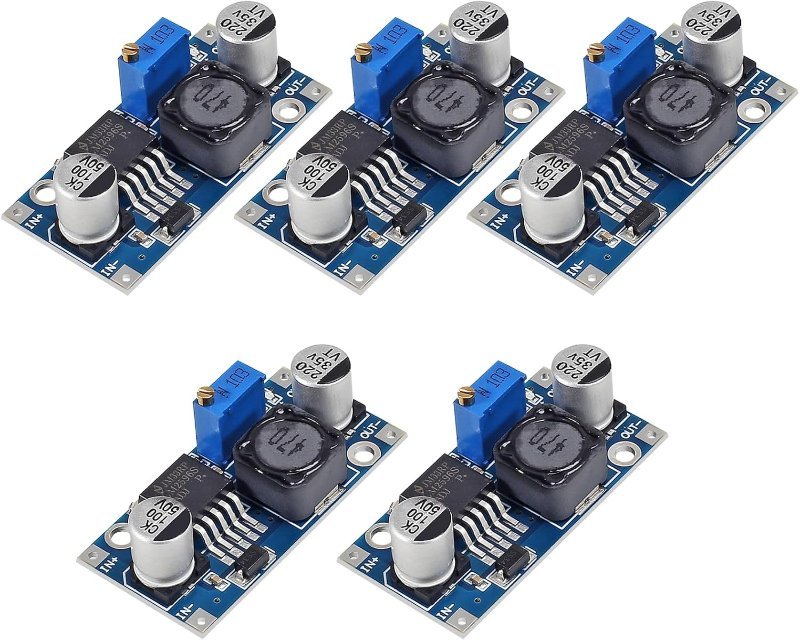
You have a battery pack or wall adapter at some voltage, and your servos want a clean 5–6 V at an amp or three. The part that bridges those is a buck converter — a step-down regulator that chops the input voltage with a switching transistor instead of burning the excess as heat, which is exactly why it can deliver current a linear regulator can’t. The LM2596 module is the default here for a reason: it takes anything from about 3 V to 40 V in, you turn the little potentiometer until the output reads 5.0 V on a multimeter, and it holds that under load at up to roughly 2 A continuous. At this price you should have several in a drawer.
Adjustable 3–40 V in, 1.5–35 V out, ~2 A continuous. Set it to 5.0 V with a screwdriver and a multimeter, feed your servo rail from it, tie grounds together. Buy the multipack — you will use all of them.
Check Price on Amazon →If you’re past two or three servos — a robotic arm, a hexapod, anything with real articulation — the wiring itself becomes the problem before the power does. Every servo needs its own signal pin, and the Uno only has so many. A PCA9685 driver board solves both at once: it’s an I2C device, meaning it talks to the Arduino over just two shared wires (SDA and SCL) instead of one pin per servo, and it generates all 16 PWM signals in dedicated hardware rather than making your sketch time them. If PWM itself is new to you, it’s the technique of switching a pin on and off very fast so the proportion of on-time encodes a value — for a servo, a pulse of about 1 ms means one end of its travel and 2 ms means the other.
The part that matters for this article, though, is the green screw terminal on the board. That terminal feeds the servo power rail directly and is deliberately isolated from the logic supply the Arduino provides. Wire your buck converter into it and servo current never touches the Arduino at all — it’s the separation this whole article is about, enforced by the board’s layout instead of by you remembering.
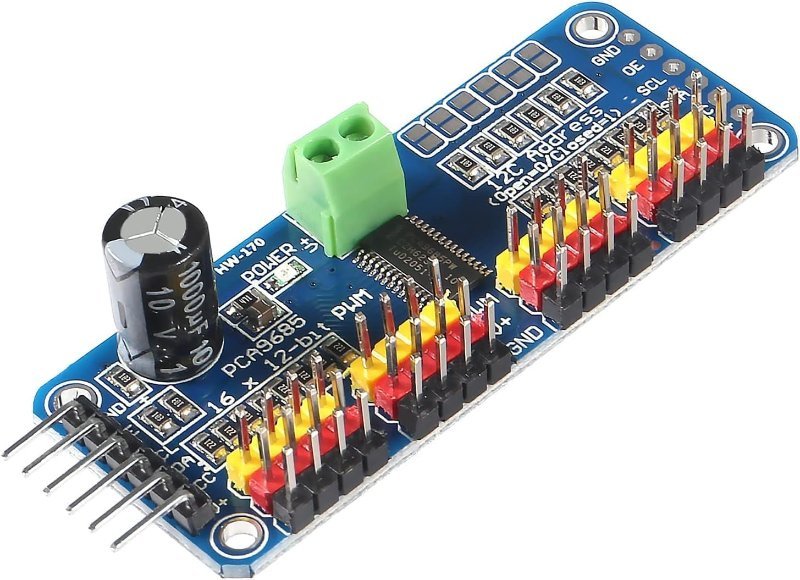
16 servos over two I2C wires, with a separate screw-terminal power input for the servo rail. Hardware PWM at 12-bit resolution, so your loop isn’t burning cycles generating pulses. Boards are chainable if you somehow need more than 16.
Check Price on Amazon →Sizing the supply, and a few things that still bite
Budget for stall, not for average draw, because stall is what causes the reset. Multiply your worst-case per-motor stall current by the number of motors that could plausibly stall at once, then add roughly 50% of headroom. Four SG90s at ~700 mA each is 2.8 A worst case, so shop for a 4 A supply and stop worrying about it. Oversizing a supply costs a few dollars; undersizing it costs you an evening of debugging code that was never broken.
Three more things worth checking once you’ve done the big fix:
- Wire gauge and breadboard rails. Thin jumper wires and breadboard contacts have real resistance. At 2 A, a few tenths of an ohm across a sketchy connection is a meaningful voltage drop right where you can least afford one. For anything past a couple of amps, run thicker wire directly rather than through breadboard strips.
- Alkaline AAs can’t do this. A 4xAA pack has high internal resistance and sags badly under motor loads. Rechargeable NiMH or a LiPo behind a buck converter behaves far better.
- Don’t stagger-start your motors as a cure. Adding delays so motors move one at a time does sometimes stop the resets, which makes it feel like a fix. It isn’t — it’s a workaround that hides an undersized supply and will fail the moment your project does two things at once.
Give the motors their own supply, tie the grounds, put a capacitor near the load. Nearly every mysterious reset, jitter, and dead-servo problem in a multi-motor build traces back to one of those three not being done.